What Does a Marketing Data Warehouse Really Cost?
Find out what a marketing data warehouse really costs, from BigQuery storage and queries to pipelines and reporting, and how to keep the bill close to zero.


Introduction
Ask what a data warehouse costs and you'll usually hear "it depends", followed by talk of enterprise contracts. For a marketing or e-commerce team bringing together ad spend, orders and website data, the real answer is a lot more encouraging. The warehouse is often the cheapest part of the whole setup. Sometimes it costs nothing at all.
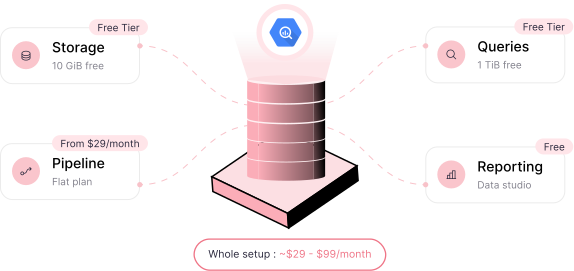
The money goes on four things: storing the data, querying it, getting it in, and reporting on it. Below, we price each one on Google BigQuery, work through a realistic example for a small team, and cover the handful of settings that stop the bill from ever surprising you.
All prices are vendors' published list prices in US dollars, checked on 30 October 2026. BigQuery prices are for the Iowa (us-central1) region; other regions differ slightly.
The four costs of a marketing data warehouse
1. Storage: usually free for marketing data
Every BigQuery billing account gets 10 GiB of storage free each month. Beyond that, active storage costs about $0.023 per GiB per month in Iowa, and it gets cheaper on its own: any table or partition left unchanged for 90 days moves to long-term storage at roughly half the price, with no difference in speed.
More to the point, marketing data is small. In one of our test stores, the entire Shopify order history, 11,529 orders going back to June 2024, takes up 2.61 MB. Daily campaign data from Google Ads and Meta is just as compact. You could store years of it and never leave the free tier.
The exception is raw event data, such as every page view and click from your website or app. That grows far faster than orders or ad metrics, so if you plan to keep it, budget for storage separately.
2. Queries: where the bill can grow
By default, BigQuery charges by the amount of data each query reads, at $6.25 per TiB. The first 1 TiB each month is free.
The details that matter:
- There is a minimum. Each query is billed for at least 10 MB, and at least 10 MB for each table it references.
- Cached results are free. If the same query runs again and BigQuery returns cached results, you aren't charged. Queries that fail aren't charged either.
- You pay for the columns you read. BigQuery stores data by column, so a query that selects five columns costs less than SELECT * on the same table.
- LIMIT doesn't save money on a normal table. BigQuery still reads the columns in full; only clustered tables can read less.
For steady, heavy workloads, Google also offers capacity pricing, where you pay for compute time (slots) instead of data read. The Standard edition starts at $0.04 per slot-hour. Small teams rarely need it; on-demand pricing with the free tier usually costs less.
3. Getting the data in: the line that varies most
Loading data into BigQuery is free when you load files in batches. The real cost is the pipeline that collects data from your ad platforms, store and CRM. You have three broad options.
Build it yourself:
You write and host scripts that call each platform's API. There is no licence fee, but someone has to build it, schedule it, and fix it every time an API changes.
Use Google's BigQuery Data Transfer Service:
Google's own products, including Google Ads, GA4, Campaign Manager, Search Ads 360 and Merchant Center, transfer for free. Connectors still in Preview, such as Shopify, HubSpot and Klaviyo, are free for now, with no SLA, and Google says billing starts once they reach general availability.
Generally available third-party connectors such as Facebook Ads are billed by compute, which Google estimates at up to about $1.20 per hour of transfer run time in Iowa.
Use an ETL tool:
You pay for the tool and it handles the APIs, scheduling and changes. The catch is that many tools price on usage, which makes your bill hard to predict before you start:
- Fivetran charges by monthly active rows (MAR), the rows it inserts, updates or deletes each month. It doesn't publish a price per row, only worked examples, and since January 2026 deletes count as paid rows too. Its free plan covers 500,000 MAR, and paid plans have a $5 minimum charge for each connection that moves between 1 and 1 million rows. Because a busy month means more changed rows, the same setup can cost different amounts from one month to the next.
- Airbyte Cloud sells credits: $20 a month buys 5 credits, which Airbyte puts at about 1 GB of syncs. Your cost follows how much data you move, which you may not know until you're running.
- Supermetrics offers BigQuery and other warehouse destinations only on its Enterprise plan, and that price isn't published: you have to ask for a quote. Clients who have come to Statfinity tell us they were quoted between $13,000 and $15,000 a year for BigQuery. Quotes vary by account, so treat that as a guide, not a list price.
- Unite has flat monthly plans that don't depend on rows or volume: “Starter” at $29 a month (3 data sources, 3 destinations, 6 pipelines) and “Standard” at $99 a month (7 data sources, all destinations, 20 pipelines).
Before you pick a tool, ask two questions: what will I pay in a busy month, and can I see that number before I'm billed?
4. Reporting: free, with one catch
Data Studio (formerly Looker Studio) is free for everyone who builds or views reports. Data Studio Pro, the paid version for teams, costs $9 per user per project per month.
The catch is that every chart in a Data Studio report runs a query against BigQuery, and those queries count towards your BigQuery usage once you pass the free tier. Data Studio caches results for 12 hours by default, which keeps repeat views cheap. Connected Sheets behave the same way: it runs its queries in BigQuery, and they are billed like any other.
A worked example for a small team
Take a typical direct-to-consumer brand: one Shopify store plus Google Ads, Meta Ads and Search Console, all loaded into BigQuery, with a Data Studio dashboard the team opens every morning.
Storage first. A few years of orders, products, customers and daily ad data comes to well under 1 GiB, comfortably inside the free 10 GiB. Cost: nothing.
Queries next. Say the dashboard has 10 charts, each reads 50 MB, and five people open it every working day without hitting the cache. That's 10 × 50 MB × 5 people × 22 days, about 55 GB a month, or roughly 5% of the free terabyte. An analyst could add a few hundred ad hoc queries on top and still not come close.
Reporting in Data Studio is free, which leaves the pipeline. That's where the money actually goes: with Unite, $29 a month on Starter for three sources, or $99 on Standard for seven.
So the whole warehouse runs at around $29 to $99 a month, almost all of it in the pipeline. The bigger cost, as ever, is your team's time.
When BigQuery costs grow
The free tier stops covering you in a few predictable situations. Raw event data is the big one: website and app events run to millions of rows a day, and those tables reach hundreds of GiB quickly. Tables without date partitions are another, because every query reads the whole table even when you only want last week. Dashboards built on SELECT * read every column when three would do.
And then there are heavy, repeated queries. An analyst who scans a 200 GB table ten times a day reads about 58 TiB a month, which comes to roughly $360 after the free tier. One habit, one table, a real bill.
None of these is a reason to avoid a warehouse. They're reasons to set it up properly from day one.
How to keep your BigQuery bill under control
- Set a maximum bytes billed on queries, or as a default for your team. A query that would read more than the limit fails without being charged.
- Partition tables by date and cluster them by the columns you filter on most, such as campaign or country. Queries then read only the slices they need.
- Preview before you run. BigQuery shows an estimate of the data a query will read before you run it. Treat it as an upper bound.
- Select only the columns you need, in queries and in Data Studio data sources.
- Set custom quotas to cap how much data a project or user can read per day.
- Create a budget with alerts in Google Cloud Billing. Note that an alerts-only budget warns you; it doesn't stop spending.
- Test in the BigQuery sandbox if you want to try things before adding a card. It has no billing account, but tables expire after 60 days and storage is capped at 10 GiB for the life of the sandbox.
What about Amazon Redshift?
Redshift Serverless is the closest AWS equivalent of BigQuery, and it charges differently. You pay for the compute while queries run, at $0.375 per RPU-hour in US East with a 60-second minimum each time, plus $0.024 per GB-month for storage. The smallest configuration is 4 RPUs, which AWS puts at as little as $1.50 an hour, and new Redshift Serverless users get a $300 credit that expires after 90 days.
For a small team with light, daily dashboard use, BigQuery's free monthly tier is hard to beat. Redshift makes more sense when the rest of your business already runs on AWS.
Frequently asked questions
Is BigQuery free?
Partly. Every billing account gets 10 GiB of storage and 1 TiB of query processing free each month. Many small marketing teams stay inside both.
What does a marketing data warehouse cost per month?
For a small team with a handful of sources, often between nothing and about $100 a month, with the pipeline as the main cost. It rises with raw event data and heavy, repeated queries.
Does Data Studio cost money with BigQuery?
Data Studio itself is free. Its charts run queries in BigQuery, which count towards your BigQuery usage once you pass the free tier.
Is Google's Data Transfer Service free?
For Google's own products such as Google Ads and GA4, yes. Connectors in Preview are free until they reach general availability. Generally available third-party connectors, such as Facebook Ads, are billed by the compute used.
Why is my BigQuery bill higher than expected?
Usually queries reading whole tables: SELECT *, missing date partitions, or dashboards that bypass the cache. Check the bytes processed for your most frequent queries first.
Key takeaways
- A marketing data warehouse has four costs: storage, queries, getting the data in, and reporting.
- BigQuery's free tier (10 GiB of storage and 1 TiB of queries a month) covers many small marketing teams completely.
- The pipeline is usually the biggest line. Compare build-it-yourself, Google's connectors and ETL tools on your own data volumes.
- Costs grow with raw event data and careless queries. Partitioning, column selection and a bytes-billed limit prevent most surprises.
Start your free Unite trial and see what your own setup would cost.
Would you rather have it built for you?
Unite is built by Statfinity, a data and AI team that builds marketing and e-commerce data warehouses for clients across the US, EU and India. If you want a warehouse that is cost-tuned from day one, tell us what you need to measure.
BUILD YOUR FIRST DATA PIPELINE
Whether you're migrating from another ETL platform or starting fresh, Unite helps your team launch reliable data pipelines fast. Need a demo, drop us a message below: